Open the laptops of ten graduate students during comprehensive exam season or dissertation writing, and nine of them will show you the exact same sight: a folder of forty PDFs where nearly every page glows neon yellow.
At the moment of reading, painting paragraphs in yellow feels deeply productive. It signals that your eyes touched the text, that you paid attention, and that you found a sentence important. Yet three weeks later—when you open a blank document to draft your literature review or empirical introduction—those forty yellow-streaked PDFs become an obstacle rather than an asset. Because every sentence looks equally urgent, nothing stands out. To find one methodology detail or one statistical finding, you are forced to re-read whole pages from scratch.
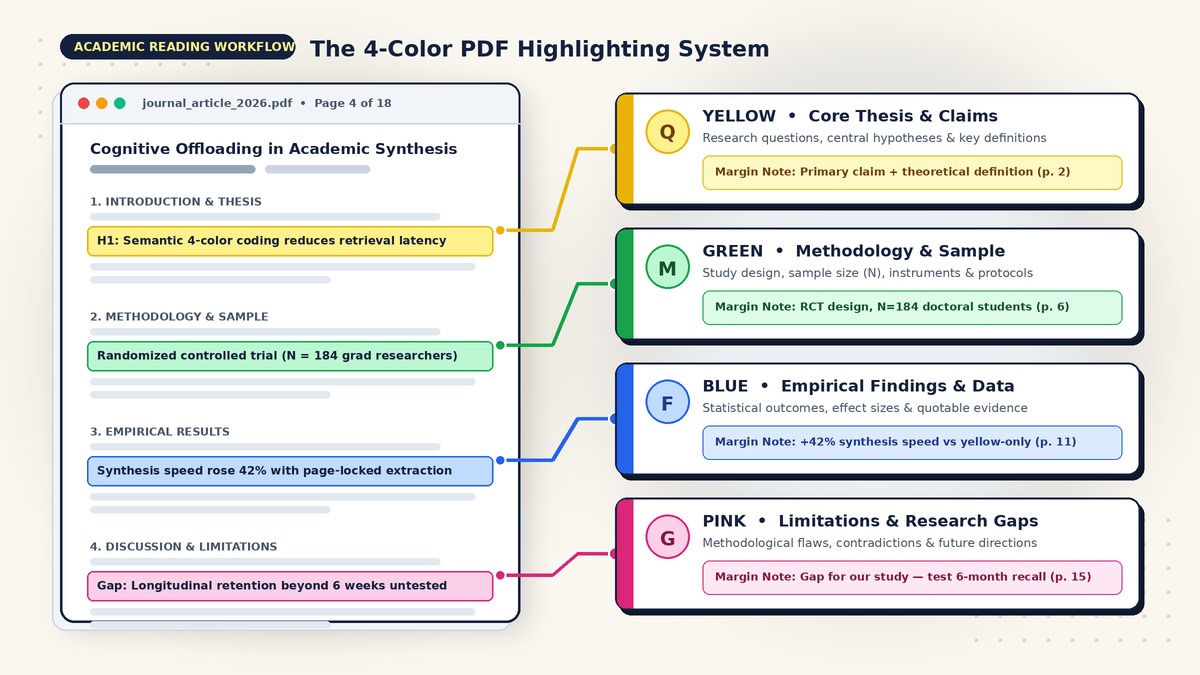
The solution is not to stop highlighting. It is to replace single-color passive marking with a 4-color PDF highlighting system designed specifically for the anatomy of a peer-reviewed research paper. When every highlight color carries a strict semantic role—separating core claims, methodology, empirical findings, and research gaps—you transform reading from passive consumption into structured pre-writing.
The "Yellow Fever" Trap: Why Single-Color Highlighting Creates Cognitive Overload
Cognitive psychologists call the illusion of competence that comes from over-marking text the "Yellow Fever" trap. When you read a complex journal article with a single default highlighter active, three failure modes happen almost immediately:
- Zero Semantic Differentiation: A foundational theoretical definition on page 2, a sample-size exclusion criterion on page 7, a regression result on page 11, and a methodological limitation on page 16 all receive the exact same visual weight. Your brain records that a passage mattered, but throws away why it mattered.
- Retrieval Latency During Writing: Academic writing is organized by argument and function—not by the chronological order in which you read individual papers. When you are drafting your Methods comparison or your Research Gap paragraph, scanning through 60 chronological yellow blocks across 25 PDFs creates massive cognitive friction.
- The Re-Reading Penalty: As we explored in Why Most People Highlight Wrong, highlighting without a categorization system simply defers the intellectual work. Instead of processing a paper once, you end up reading it three times: once when you download it, once when you hunt for quotes, and once when you verify page numbers before submission.
To break out of the Yellow Fever trap, you do not need a complicated twelve-color rainbow that requires a legend taped to your monitor. Working memory handles four distinct categories effortlessly—and by design, every empirical and theoretical research paper maps onto four core building blocks.
The 4-Color Semantic Code for Research Papers
Before you open your next journal article in the Readoku Online PDF Reader (or your preferred desktop PDF app), assign these four roles to your highlight palette and keep them consistent across every project:
1. Yellow — Core Thesis, Research Questions & Definitions (What the paper argues)
Reserve Yellow exclusively for the conceptual spine of the paper. Instead of using yellow as a catch-all marker for "interesting text," restrict it to:
- The central research question(s) or formal hypotheses (
H1,H2,H3). - The authors' primary thesis statement or overarching theoretical claim.
- Canonical definitions of core constructs that you may need to cite when defining terms in your own manuscript.
Where it lives: Primarily in the Abstract, the final two paragraphs of the Introduction, and the Theoretical Framework section. In a typical 20-page paper, you should have only 3 to 6 Yellow highlights.
2. Green — Methodology, Sample & Experimental Design (How the study was conducted)
Assign Green to every detail that explains how the authors generated or analyzed their evidence. Green highlights allow you to evaluate internal validity and compare study designs across your field at a glance:
- Study design and paradigm: Randomized controlled trial (RCT), longitudinal panel, qualitative ethnography, PRISMA systematic review, or computational simulation.
- Sample characteristics: Sample size (
N), participant demographics, geographic context, inclusion/exclusion criteria, and response rates. - Instruments, datasets, and analytical models: Survey scales, sensors, archival corpora, or statistical estimators used.
Where it lives: Almost entirely inside the Materials and Methods, Data, or Research Design section.
3. Blue — Key Empirical Findings, Data & Quotable Evidence (What the study proved)
Use Blue for the concrete empirical payload of the paper—the verified outcomes you will cite as evidence in your literature review:
- Primary statistical or qualitative results: Effect sizes, direction of relationships, confidence intervals, and hypothesis test outcomes (for example,
beta = 0.34, p-value under 0.01). - Unexpected empirical patterns: Subgroup differences or moderating effects that emerged from the data.
- Standout quotable synthesis sentences: The 1 or 2 crisp sentences where the authors state their main empirical takeaway in plain language.
Where it lives: In the Results / Findings section and the opening summary paragraph of the Discussion.
4. Pink / Red — Limitations, Methodological Flaws, Contradictions & Research Gaps (Where your study fits in)
Assign Pink (or Red) to friction, critique, and opportunity. For graduate students and faculty writers, Pink is the highest-leverage color in the entire system because it directly writes the motivation for your own research:
- Author-acknowledged limitations: Small sample sizes, cross-sectional designs, self-report bias, or narrow demographic scope.
- Your own methodological critique: Uncontrolled confounding variables, questionable operationalizations, or overclaimed causal conclusions.
- Contradictions with prior literature: Passages where findings clash with earlier studies.
- Explicit calls for future research: Unanswered questions that justify your thesis, dissertation, or grant proposal.
Where it lives: Primarily in the Limitations and Future Directions subsections of the Discussion, plus anywhere in the Methods or Results where you spot a flaw.
Concrete Walkthrough: Applying the 4-Color System to a Real Research Paper
To see how this works in practice, imagine you are reading an empirical study on digital reading comprehension and cognitive offloading (Vance, Okafor, & Lindqvist, 2025). Rather than highlighting whole paragraphs, you pair atomic 4-color highlights with a 5-word margin note that captures the takeaway in your own voice.
Abstract & Introduction (Pages 1–3)
- Yellow Highlight (p. 2): "We test whether structured semantic annotation mitigates the shallow processing penalty typically observed during screen-based academic reading (H1)."
- 5-Word Margin Note:
Tests semantic coding vs screen-inferiority
- 5-Word Margin Note:
- Yellow Highlight (p. 3): "We define semantic offloading as the external categorization of claims by rhetorical role during initial encoding."
- 5-Word Margin Note:
Core definition: semantic offloading construct
- 5-Word Margin Note:
Methodology & Experimental Design (Pages 5–7)
- Green Highlight (p. 5): "A randomized controlled laboratory experiment was conducted with N = 216 doctoral students across four European research universities."
- 5-Word Margin Note:
RCT, N=216 European PhD students
- 5-Word Margin Note:
- Green Highlight (p. 6): "Participants read three 6,500-word empirical articles under one of three conditions: single-color yellow highlighting, 4-color semantic highlighting, or unassisted reading, followed by a timed synthesis essay."
- 5-Word Margin Note:
3-arm design: yellow vs 4-color
- 5-Word Margin Note:
Empirical Results (Pages 8–12)
- Blue Highlight (p. 9): "Researchers in the 4-color semantic condition completed their cross-paper synthesis essays 38% faster than single-color highlighters (Cohen's d = 0.74, p-value below 0.001) while integrating 2.3x more cross-study methodological comparisons."
- 5-Word Margin Note:
38% faster synthesis, d=0.74
- 5-Word Margin Note:
- Blue Highlight (p. 11): "Single-color highlighters spent an average of 19.4 minutes re-scanning previously marked PDF pages during the 45-minute writing window, compared to 4.8 minutes in the 4-color group."
- 5-Word Margin Note:
Yellow-only wasted 19m re-scanning PDFs
- 5-Word Margin Note:
Discussion, Limitations & Gaps (Pages 13–15)
- Pink Highlight (p. 14): "Because synthesis essays were written immediately after the reading session, our design does not measure delayed retention or literature retrieval across multi-month thesis projects."
- 5-Word Margin Note:
Limitation: immediate test, no longitudinal
- 5-Word Margin Note:
- Pink Highlight (p. 15): "Future work should examine whether automated color-grouped extraction further reduces cognitive load when synthesizing 20 or more studies simultaneously."
- 5-Word Margin Note:
Direct gap for our study!
- 5-Word Margin Note:
Without re-reading a single unselected paragraph of the 15-page PDF, you now have the complete skeleton of Vance et al. (2025) pre-sorted by rhetorical function, tagged with exact page numbers, and annotated with concise margin cues.
The 15% Highlighting Rule: Keeping Highlights Atomic
Even the best 4-color system breaks down if you highlight half of every page. To keep your extracted notes crisp, pair the 4-color code with The 15% Highlighting Rule (one of our core Smart Reading Tricks for researchers):
- Never highlight more than 10% to 15% of any single page. On a 450-word page, your highlights across all four colors combined should total no more than 45 to 65 words (2 to 3 tight sentences).
- Highlight the subject-verb-object core, not rhetorical filler. Skip throat-clearing phrases and mark only the substantive claim.
- Finish the paragraph before you touch the highlighter. Read to the period first, identify the single sentence carrying the argument, and mark it in the right color.
- Attach a 5-word margin note to every Pink and Blue highlight. A raw highlight records what the author said; a 5-word note records how you will use it (e.g.,
Contradicts Smith 2023 on sample).
How to Filter & Export Highlights by Color in One Click with Readoku
Color-coding a PDF is only half the workflow. The real time multiplier happens when you pull those four color streams out of your PDFs automatically instead of copy-pasting snippets by hand.
With Readoku's PDF Highlight Extractor, you can extract, filter, and export your annotations by color in seconds:
- Upload Your Annotated Research Papers: Open the Readoku PDF Highlight Extractor (or read directly inside the Readoku Online PDF Reader) and drop in your highlighted PDFs from Zotero, Adobe Acrobat, macOS Preview, or Readoku.
- Filter Highlights by Semantic Color: Readoku extracts every highlight, underline, and margin comment while preserving its exact page number and original highlight color. Using the color filter bar—detailed in How to Filter Highlights by Color—isolate any stream in one click:
- Yellow for outlining theoretical frameworks and core definitions.
- Green for comparing methodologies and auditing sample sizes (
N). - Blue for drafting empirical paragraphs with page-verified findings.
- Pink for writing the "Gap in the Literature" section of your manuscript.
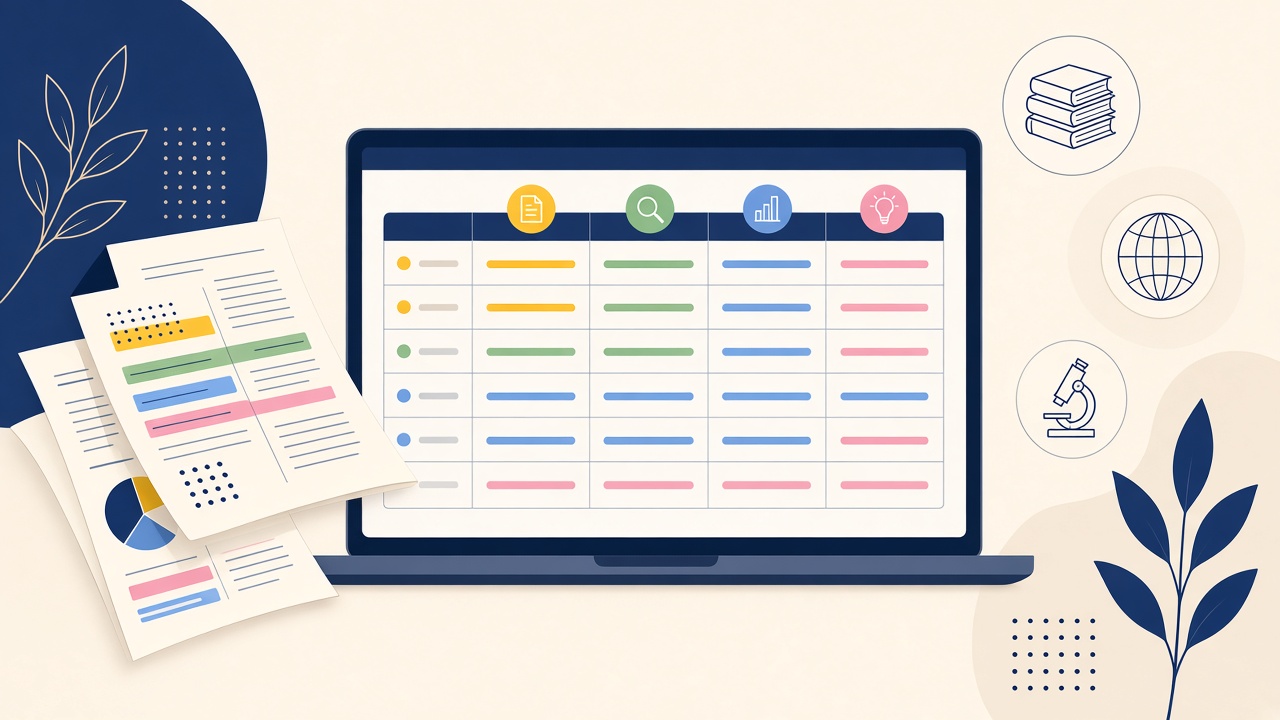
- Export With Colors Intact: As shown in Export Highlights from PDF with Color, Readoku exports your color-coded notes to Word (DOCX), Excel (XLSX), CSV, Markdown, HTML, and JSON. Even better, these four streams map directly into the columns of our guide on How to Build a Literature Review Matrix from PDF Highlights in 15 Minutes.
Stop Re-Reading Yellow Pages—Extract Your Color-Coded Highlights Today
Your highlights should write the first draft of your literature review for you, not force you to read every article twice. Upload an annotated paper to Readoku's Free PDF Highlight Extractor or open your next journal article in the Readoku Online PDF Reader to filter, sort, and export your highlights by color in one click.